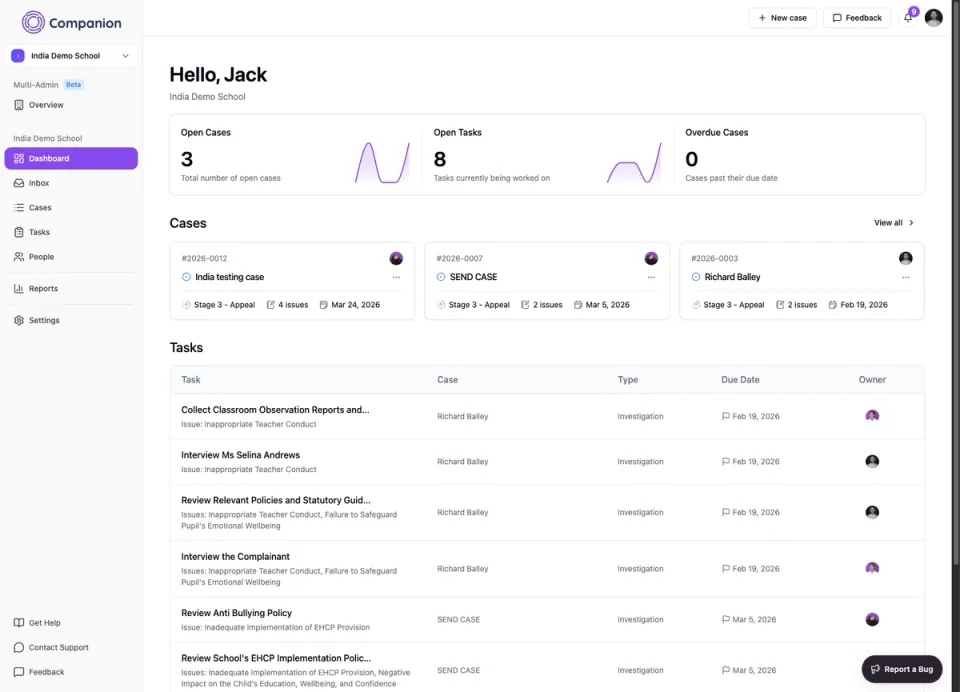
Companion Dashboard
Last updated 19 February 2026
As an Admin user, you will have full visibility of all information stored within your Companion system. This includes all cases, tasks, and activity across your organisation. The Dashboard provides a central overview, bringing together key information in one place so you can quickly understand what requires attention.
The Dashboard is designed to give you a clear snapshot of your current workload. You can see open and closed cases, outstanding tasks, and important updates without needing to search through different areas of the system.
Please note: If an admin user has been blocked from a specific case, information related to that case will not be displayed on their dashboard.
If you have Member access, your view will be limited to the cases and tasks you are assigned to, or those you have permission to access. This ensures that users only see information relevant to their role.
From the Dashboard, you can click directly into any case or task to view the full details. Once opened, you will be able to review information, add notes, update statuses, assign actions, or take any other necessary steps to move the case forward.